Transformers are the foundational technology behind most of the modern AI tools we use every day. The most prominent
real-life applications of Transformer models in Natural Language Processing (NLP), for example, include
Machine Translation
This was the original task the Transformer was designed for. Services like Google Translate
use Transformer models to read an entire sentence in one language, understand its full context, and then generate a
high-quality translation in another language.
AI Chatbots and Generative AI
This is the most famous application today. Tools like ChatGPT, Gemini, and Claude are built on large Transformer
models (specifically Decoder-only models like GPT). They are trained to predict the next logical word in a
response, allowing them to hold conversations, answer complex questions, write essays, and much more.
The model takes user-typed question (such as “What is the capital of France?”) as an initial sequence of text,
converts it into numerical tokens, and feeds it through transformer, which then “understands” the full context of the
question, also called prompt. The model’s response is in the form of a prediction for the very first word of its
answer (e.g., “The”).
In the “Generation” stage, Gemini, for example, employees autoregressive “loop” to build the response one word (or
token) at a time, with each new word depending on all the words that came before it:
To get Word #1 (“The”):
Input: “What is the capital of France?”
Output: “The”
To get Word #2 (“capital”):
Input: “What is the capital of France? The”
Output: “capital”
To get Word #3 (“of”):
Input: “What is the capital of France? The capital”
Output: “of”
To get Word #4 (“France”):
Input: “What is the capital of France? The capital of”
Output: “France”
…and so on. The model appends its own previously generated word to the sequence and feeds that new, longer sequence
back into itself to predict the very next word.
Code Generation (AI Assistants)
This is a specialized form of text generation where the “language” is code. Tools like GitHub Copilot and other
AI-powered IDEs use Transformer models trained on billions of lines of public code. They can read our existing code
and comments to suggest auto-completions, write entire functions, or even help us debug.
With this sense of practicality in mind, let’s learn what’s under the hood of transformer.
The Transformer was introduced in the 2017 paper “Attention Is All You Need” by researchers at Google. Its creation
was a direct response to the fundamental limitations of the dominant sequence-to-sequence (seq2seq) models of the time:
Recurrent Neural Networks (RNNs), including LSTMs and GRUs.
Transformers are everywhere and its models are used to solve all kinds of tasks across different modalities, including
natural language processing (NLP), computer vision, audio processing, and more. The
🤗 Transformers library by Hugging Face provides the functionality to
create and use those shared models. The Model Hub contains millions of pretrained models that anyone can download and
use. We can also upload our own models to the Hub
Before diving into how Transformer models work under the hood, let’s look at an example of how they can be used to solve
some interesting NLP problems to give us some intuitive feels.
The most basic object in the 🤗 Transformers library is the pipeline() function. It connects a model with its
necessary preprocessing and postprocessing steps, allowing us to directly input any text and get an intelligible
answer. Let’s take named entity recognition as an example
TIP
Named entity recognition (NER) is a task where the model has to find which parts of the input text correspond to
entities such as persons, locations, or organizations.
1
from transformers import pipeline
2
3
ner =pipeline("ner",grouped_entities=True)
4
ner("My name is Jiaqi and I work at OpenML in Shenzhen.")
Here the model correctly identified that Jiaqi is a person (PER), OpenML an organization (ORG), and Shenzhen a
location (LOC).
There are three main steps involved when we pass some text to the pipeline above:
The text is preprocessed into a format the model can understand.
The preprocessed inputs are passed to the model.
The predictions of the model are post-processed, so we can make sense of them.
The pipeline() function supports multiple modalities allowing us to work with not just text, but also images, audio,
and even multimodal tasks. In this post we’ll focus on text tasks
All the Transformer models have been trained as large language models and is primarily composed of 2 blocks:
Encoder (left): The encoder receives an input and builds a representation of it (its features). This means that
the model is optimized to acquire understanding from the input.
Decoder (right): The decoder uses the encoder’s representation (features) along with other inputs to generate a
target sequence. This means that the model is optimized for generating outputs.
IMPORTANT
Transformers are large language models
A key feature of Transformer models is that they are built with special layers called attention layers. In fact, the
title of the paper introducing the Transformer architecture was “Attention Is All
You Need”! But before diving into the real business of transformers, we must
learn what was before the transformer.
Before transformer the sequence-to-sequence models are deep learning models that have achieved a lot of success in tasks
like machine translation, text summarization, and image captioning. Google Translate started using such a model in
production in late 2016. These models are explained in the two pioneering papers (Sutskever et al., 2014, Cho et al., 2014).
A sequence-to-sequence model is a model that takes a sequence of items (words, letters, features of an images, etc) and
outputs another sequence of items. A trained model would work like this:
In neural machine translation, a sequence is a series of words, processed one after another. The output is, likewise, a
series of words:
Under the hood, the model is composed of an encoder and a decoder. The encoder processes each item in the input
sequence, it compiles the information it captures into a vector (called the context). After processing the entire
input sequence, the encoder sends the context over to the decoder, which begins producing the output sequence item by
item.
The same applies in the case of machine translation.
The context is a vector (an array of numbers, basically) in the case of machine translation. Both encoder and decoder
tend to be recurrent neural networks (RNN)
TIP
The context is a vector of floats. Later in this post we will visualize vectors in color by assigning brighter colors to
the cells with higher values.
We can set the size of the context vector when we set up our model. It is basically the number of hidden units in the
encoder RNN. These visualizations show a vector of size 4, but in real world applications the context vector would be of
a size like 256, 512, or 1024.
By design, an RNN takes 2 inputs at each time step:
an input (in the case of the encoder, one word from the input sentence), and
a hidden state
The word, however, needs to be represented by a vector. To transform a word into a vector, we turn to the class of
methods called word embedding algorithms. These turn words into vector spaces that
capture a lot of the meaning/semantic information of the words. Here is an example:
We need to turn the input words into vectors before processing them. That transformation is done using a word
embedding algorithm. We can use pre-trained embeddings or train our own embedding on our dataset. Embedding vectors of
size 200 or 300 are typical, we’re showing a vector of size four for simplicity.
Now that we have introduced our main vectors/tensors, let’s briefly touch the mechanics of an RNN (we expand RNN
thoroughly and systematically later) and establish a visual language to describe
these models:
The next RNN step takes the second input vector and hidden state #1 to create the output of that time step.
In the following visualization, each pulse for the encoder or decoder is that RNN processing its inputs and generating
an output for that time step. Since the encoder and decoder are both RNNs, each time step one of the RNNs does some
processing, it updates its hidden state based on its inputs and previous inputs it has seen.
Let’s look at the hidden states for the encoder. Notice how the last hidden state is actually the context we pass along
to the decoder.
The decoder also maintains a hidden state that it passes from one time step to the next. We just didn’t visualize it in
this graphic because we are concerned with the major parts of the model for now.
Let’s now look at another way to visualize a sequence-to-sequence model. This animation will make it easier to
understand the static graphics that describe these models. This is called an “unrolled” view where instead of showing
the one decoder, we show a copy of it for each time step. This way we can look at the inputs and outputs of each time
step.
In this subsection, we will go over the concept of embedding, one of the fascinating ideas in machine learning, and the
mechanics of generating embeddings with word2vec.
Those who ever used Siri, Google Assistant, Alexa, Google Translate, or even smartphone keyboard with next-word
prediction has already been benefited from this idea that has become central to Natural Language Processing models.
There has been quite a development over the last couple of decades in using embeddings for neural models (Recent
developments include contextualized word embeddings leading to cutting-edge models like BERT and GPT2).
Here is trained word-vector examples (also called word embeddings):
It’s a list of 50 numbers. We can’t tell much by looking at the values. But let’s visualize it a bit so that we could
compare it with other word vectors. First let’s put all these numbers in one row:
Next let’s color code the cells based on their values (red if they’re close to 2, white if they’re close to 0, blue if
they’re close to -2):
We proceed by ignoring the numbers and only looking at the colors to indicate the values of the cells. Let’s now
contrast “King” against other words:
See how “Man” and “Woman” are much more similar to each other than either of them is to “king”? This tells us something.
These vector representations capture quite a bit of the information/meaning/associations of these words.
Here’s another list of examples (compare by vertically scanning the columns looking for columns with similar colors):
A few things to point out:
There’s a straight red column through all of these different words. They’re similar along that dimension (and we don’t
know what each dimensions codes for)
We can see how “woman” and “girl” are similar to each other in a lot of places. The same with “man” and “boy”
“boy” and “girl” also have places where they are similar to each other, but different from “woman” or “man”. Could
these be coding for a vague conception of youth? possible.
All but the last word are words representing people. I added an object (water) to show the differences between
categories. We can, for example, see that blue column going all the way down and stopping before the embedding for
“water”.
There are clear places where “king” and “queen” are similar to each other and distinct from all the others. Could
these be coding for a vague concept of royalty?
Analogies
The famous examples that show an incredible property of embeddings is the concept of analogies. We can add and subtract
word embeddings and arrive at interesting results. The most famous example is the formula: “king” - “man” + “woman”.
Using the Gensim library in python, we can add and subtract word vectors, and it
would find the most similar words to the resulting vector. The image shows a list of the most similar words, each with
its cosine similarity.
As we add and subtract word vectors, we would find the most similar words to the resulting vector. The image shows a
list of the most similar words, each with its cosine similarity.
We can visualize this analogy as we did previously:
The resulting vector from “king-man+woman” doesn’t exactly equal “queen”, but “queen” would be the closest word to it
from this example of 400,000 word embeddings.
Now that we’ve looked at trained word embeddings, let’s learn more about the training process. But before we get to
word2vec, we need to look at a conceptual parent of word embeddings: the neural language model.
If one wanted to give an example of an NLP application, one of the best examples would be the next-word prediction
feature of a smartphone keyboard. It’s a feature that billions of people use hundreds of times every day.
Next-word prediction is a task that can be addressed by a language model. A language model can take a list of words
(let’s say two words), and attempt to predict the word that follows them.
In the screenshot above, we can think of the model as one that took in these two words (“thou” and “shalt”) and returned
a list of suggestions (“not” being the one with the highest probability):
We can think of the model as looking like this black box:
In practice, however, the model doesn’t output only one word. It actually outputs a probability score for all the words
it knows (the model’s “vocabulary”, which can range from a few thousand to over a million words). The keyboard
application then has to find the words with the highest scores, and present those to the user.
The output of the neural language model is a probability score for all the words the model knows. We are referring
to the probability as a percentage here, but 40% would actually be represented as 0.4 in the output vector.
After being trained, early neural language models (Bengio 2003) would calculate a prediction in 3 steps:
The first step is the most relevant for us as we discuss embeddings. One of the results of the training process was this
matrix that contains an embedding for each word in our vocabulary. During prediction time, we just look up the
embeddings of the input word, and use them to calculate the prediction:
Let’s now turn to the training process to learn more about how this embedding matrix was developed.
Language models have a huge advantage over most other machine learning models. That advantage is that we are able to
train them on running text – which we have an abundance of. Think of all the books, articles, Wikipedia content, and
other forms of text data we have lying around. Contrast this with a lot of other machine learning models which need
hand-crafted features and specially-collected data.
We get embeddings of words by looking at which other words they tend to appear next to. The mechanics of that is that
We get a lot of text data (say, all Wikipedia articles, for example). then
We have a window (say, of three words) that we slide against all of that text.
The sliding window generates training samples for our model
As this window slides against the text, we (virtually) generate a dataset that we use to train a model. To look exactly
at how that’s done, let’s see how the sliding window processes this phrase:
When we start, the window is on the first three words of the sentence:
We take the first two words to be features, and the third word to be a label:
We now have generated the first sample in the dataset we can later use to train a language model.
We then slide our window to the next position and create a second sample:
The second example is now generated.
Pretty soon we have a larger dataset of which words tend to appear after different pairs of words:
The example above is trying to predict the target word by looking at two words before it, we can also look at two words
after it. Another architecture that also tended to show great results does things a little differently and is the one we
will be using as part of our following discussion: instead of guessing a word based on its context (the words before or
maybe even after it), this architecture tries to guess neighboring words within certain radius using the current word.
It is called skipgram, which has a window sliding across the texts like this:
The word in the green slot would be the input(or current) word, each pink box would be a possible output within its
radius. In this case, the radius is 2 (words)
A single snapshot of the sliding window creates four separate samples in our training dataset:
We then iteratively slide our window to the next positions… A couple of positions later, we have a lot more examples:
Now that we have our skipgram training dataset (shown in the image above) that we extracted from existing running
text, let’s glance at how we use it to train a basic neural language model that predicts the neighboring word.
We start with the first sample in our dataset. We grab the feature and feed to the untrained model asking it to predict
an appropriate neighboring word.
The model conducts the three steps and outputs a prediction vector (with a probability assigned to each word in its
vocabulary). Since the model is untrained, it’s prediction is sure to be a wild guess at this stage. But that’s okay. We
know what word it should have guessed – the label/output cell in the row we’re currently using to train the model:
How far off was the model? We could choose to subtract the two vectors resulting in an error vector:
This error vector can now be used to update the model so the next time, it’s a little more likely to guess thou when
it gets not as input.
And that concludes the first step of the training. We proceed to do the same process with the next sample in our
dataset, and then the next, until we’ve covered all the samples in the dataset. That concludes one epoch of training.
We do it over again for a number of epochs, and then we’d have our trained model and we can extract the embedding matrix
from it and use it for any other application.
TIP
One training step processes one sample of dataset while one epoch iterates through the entire dataset once
While this extends our understanding of the process, it’s still not how word2vec is actually trained. We’re missing a
couple of key ideas:
Recall the 3 steps of how this neural language model calculates its prediction:
The 3rd step (Project to output vocabulary) is very expensive from a computational point of view - especially knowing
that we will do it once for every training sample in our dataset (easily tens of millions of times). We need to do
something to improve performance, which is missing from the basic training strategy introduced above.
One solution for boosting the performance is to split our target into 2 steps:
Generate high-quality word embeddings (Don’t worry about next-word prediction).
Use these high-quality embeddings to train a language model (to do next-word prediction).
We will be focusing on step 1 as we’re focusing on embeddings. To generate high-quality embeddings using a
high-performance model, we can switch the model’s task from predicting a neighboring wordto taking the input and
output word, and outputing a score indicating if they’re neighbors or not (0 for “not neighbors”, 1 for “neighbors”),
i.e.:
This simple switch changes the model we need from a neural network, to a logistic regression model - thus it becomes
much simpler and much faster to calculate.
This switch requires we switch the structure of our dataset – the label is now a new column with values 0 or 1. They
will be all 1 since all the words we added are neighbors.
This can now be computed at blazing speed – processing millions of examples in minutes. But there’s one loophole we need
to close. If all of our examples are positive (target: 1), we open ourselves to the possibility of a smartass model that
always returns 1 - achieving 100% accuracy, but learning nothing and generating garbage embeddings.
To address this, we need to introduce negative samples to our dataset - samples of words that are not neighbors. Our
model needs to return 0 for those samples. Now that’s a challenge that the model has to work hard to solve - but still
at blazing fast speed.
But what do we fill in as output words? We randomly sample words from our vocabulary
This idea is inspired by Noise-contrastive estimation. We
are contrasting the actual signal (positive examples of neighboring words) with noise (randomly selected words that are
not neighbors). This leads to a great tradeoff of computational and statistical efficiency.
We have now covered two of the central ideas in word2vec: as a pair, they’re called skipgram with negative sampling:
Now that we’ve established the two central ideas of skipgram and negative sampling, we can proceed to look closer at the
actual word2vec training process.
Before the training process starts, we pre-process the text we’re training the model against. In this step, we determine
the size of our vocabulary (we’ll call this vocab_size, think of it as, say, 10,000) and which words belong to it.
At the start of the training phase, we create two matrices – an Embedding matrix and a Context matrix. These two
matrices have an embedding for each word in our vocabulary (So vocab_size is one of their dimensions). The second
dimension is how long we want each embedding to be (embedding_size – 300 is a common value, but we’ve looked at an
example of 50 earlier in our discussion here).
At the start of the training process, we initialize these matrices with random values. Then we start the training
process. In each training step, we take one positive example and its associated negative examples. Let’s take our
first-step data (highlighted in light blue rows):
Now we have 4 words: the input word not and output/context words: thou (the actual neighbor), aaron, and taco
(the negative examples). We proceed to look up their embeddings - for the input word, we look in the Embedding matrix.
For the context words, we look in the Context matrix (even though both matrices have an embedding for every word in
our vocabulary).
Then, we take the dot product of the input embedding with each of the context embeddings. In each case, that would
result in a number, that number indicates the similarity of the input and context embeddings
Now we need a way to turn these scores into something that looks like probabilities - we need them to all be positive
and have values between zero and one. This is a great task for sigmoid, the logistic operation.
And we can now treat the output of the sigmoid operations as the model’s output for these examples. We can see that
taco has the highest score and aaron still has the lowest score both before and after the sigmoid operations.
Now that the untrained model has made a prediction, and seeing as though we have an actual target label to compare
against, let’s calculate how much error is in the model’s prediction. To do that, we just subtract the sigmoid scores
from the target labels (error = target - sigmoid_scores).
Here comes the “learning” part of “machine learning”. We can now use this error score to adjust the embeddings of not,
thou, aaron, and taco so that the next time we make this calculation, the result would be closer to the target
scores.
This concludes the training step. We emerge from it with slightly better embeddings for the words involved in this step
(not, thou, aaron, and taco). We now proceed to our next step (the next positive sample and its associated
negative samples) and do the same process again.
The embeddings continue to be improved while we cycle through our entire dataset for a number of times. We can then stop
the training process, discard the Context matrix, and use the Embeddings matrix as our pre-trained embeddings for
the next task.
Window Size and Number of Negative Samples
Two key hyperparameters in the word2vec training process are the window size and the number of negative samples.
Different tasks are served better by different window sizes. One heuristic is that smaller window sizes (2-15) lead to
embeddings where high similarity scores between two embeddings indicates that the words are interchangeable (notice that
antonyms are often interchangable if we’re only looking at their surrounding words – e.g. good and bad often appear in
similar contexts). Larger window sizes (15-50, or even more) lead to embeddings where similarity is more indicative of
relatedness of the words.
The number of negative samples is another factor of the training process. The original paper prescribes 5-20 as being a
good number of negative samples. It also states that 2-5 seems to be enough when you have a large enough dataset.
There’s something magical about Recurrent Neural Networks (RNNs). Sometimes the ratio of how simple a model is to the
quality of the results we get out of it blows past our expectations, and RNN gives us one of those times.
Depending on your background you might be wondering: What makes Recurrent Networks so special? A glaring limitation of
Vanilla Neural Networks (and also Convolutional Networks)
is that their API is too constrained: they accept a fixed-sized vector as input (e.g. an image) and produce a
fixed-sized vector as output (e.g. probabilities of different classes). Not only that: These models perform this
mapping using a fixed amount of computational steps (e.g. the number of layers in the model). The core reason that
recurrent nets are more exciting is that they allow us to operate over sequences of vectors: Sequences in the input, the
output, or in the most general case both. A few examples may make this more concrete:
Each rectangle is a vector and arrows represent functions (e.g. matrix multiply). Input vectors are in red, output
vectors are in blue and green vectors hold the RNN’s state (more on this later). One great thing about the RNNs is that
they offer a lot of flexibility on how we wire up the neural network architecture. Normally when we are working with
neural networks, we are given a fixed sized input vector (red boxes above), then we process it with some hidden layers
(green), and we produce a fixed sized output vector (blue). The left-most model in figure below is the Vanilla Neural
Networks, which receives a single input and produce one output (The green box in between actually represents
layers of neurons). The rest of the models on the right are all Recurrent Neural Networks that allow us to
operate over sequences of input, output, or both at the same time:
An example of one-to-many model is image captioning where we are given a fixed sized image and produce a sequence
of words that describe the content of that image through RNN
An example of many-to-one task is sentiment classification in NLP where we are given a sequence of words of a
sentence and then classify what sentiment (e.g. positive or negative) that sentence is.
An example of many-to-many task is machine translation in NLP, where we can have an RNN that takes a sequence of
words of a sentence in English, and then this RNN is asked to produce a sequence of words of a sentence in German.
There is also a variation of many-to-many task as shown in the last model in figure below, where the model
generates an output at every timestep. An example of this many-to-many task is video classification on a frame level
where the model classifies every single frame of video with some number of classes. We should note that we don’t want
this prediction to only be a function of the current timestep (current frame of the video), but also all the timesteps
(frames) that have come before this video.
The sequence regime of operation is much more powerful compared to fixed networks that are doomed from the get-go by a
fixed number of computational steps. Moreover, as we’ll see in a bit, RNNs combine the input vector with their state
vector with a fixed (but learned) function to produce a new state vector. This can in programming terms be interpreted
as running a fixed program with certain inputs and some internal variables. Viewed this way, RNNs essentially describe
programs. In fact, it is known that RNNs are Turing-Complete
in the sense that they can simulate arbitrary programs (with proper weights).
TIP
Training vanilla neural nets is optimization over functions, training recurrent nets is optimization over programs.
At the core, RNNs accept an input vector x and give us an output vector y. This output vector’s contents are
influenced not only by the input we just fed in, but also on the entire history of inputs we’ve fed in from the past.
The RNN’s API consists of a single step function:
1
rnn =RNN()
2
y = rnn.step(x)
This is where RNN starts to model the notion of “memory”: The RNN class has some internal state that is updated
every time step() is called. In the simplest case this state consists of a single hidden vector h:
The code snippet above specifies the forward pass of a vanilla RNN. This RNN’s parameters are the 3 matrices W_hh,
W_xh, and W_hy. The hidden state self.h is initialized with the zero vector. The np.tanh function implements a
non-linearity that squashes the activations to the range [-1, 1]. Notice briefly how this works: There are 2 terms
inside the tanh: one is based on the previous hidden state and one is based on the current input. In numpy np.dot is
matrix multiplication. The two intermediates interact with addition, and then get squashed by the tanh into the new
state vector.
We initialize the matrices of the RNN with random numbers and the bulk of work during training goes into finding the
matrices that give rise to desirable behavior, as measured with some loss function that expresses our preference to what
kinds of outputs y we would like to see in response to our input sequences x.
Going Deep
RNNs are neural networks and everything works monotonically better (if done right) if we put on our deep learning hat
and start stacking models up like pancakes. For instance, we can form a 2-layer recurrent network as follows:
1
y1 = rnn1.step(x)
2
y = rnn2.step(y1)
In other words we have two separate RNNs: One RNN is receiving the input vectors and the second RNN is receiving the
output of the first RNN as its input. Except neither of these RNNs know or care - it’s all just vectors coming in and
going out, and some gradients flowing through each module during backpropagation.
It’s worth mentioning that in practice most of us use a slightly different formulation called a Long Short-Term Memory
(LSTM) network. The LSTM is a particular type of recurrent network that works slightly better in practice, owing to its
more powerful update equation and some appealing backpropagation dynamics. The “Forget Gate” mechanism, as we introduce
next, is an explicit memory management that is a precursor to how Attention mechanisms later
decide what to “attend” to.
We’ve seen so far that a recurrent neural network can be thought of as multiple copies of the same network, each passing
a message to a successor:
In the last few years, there have been incredible success applying RNNs to a variety of problems: speech recognition,
language modeling, translation, image captioning, etc. Essential to these successes is the use of LSTMs, a kind of
recurrent neural network which works, for many tasks, much better than the standard version. Almost all exciting results
based on recurrent neural networks are achieved with them.
Sometimes, we only need to look at recent information to perform the present task. For example, consider a language
model trying to predict the next word based on the previous ones. If we are trying to predict the last word in “the
clouds are in the sky”, we don’t need any further context - it’s pretty obvious the next word is going to be sky. In
such cases, where the gap between the relevant information and the place that it’s needed is small, RNNs can learn to
use the past information.
There are cases, however, where we need more context. Consider trying to predict the last word in the text “I grew up in
China … I speak fluent Chinese.” Recent information suggests that the next word is probably the name of a language,
but if we want to narrow down which language, we need the context of France, from further back. It’s entirely possible
for the gap between the relevant information and the point where it is needed to become very large. Unfortunately, as
that gap grows, RNNs become unable to learn to connect the information.
Hochreiter, 1991 (German)
It is very worth mentioning the 1991 Diploma Thesis
(equivalent to a Master’s thesis) of Sepp Hochreiter which explored in depth why RSS doesn’t learn in “long-term”
and found some pretty fundamental reasons of why so.
The thesis is titled Untersuchungen zu dynamischen neuronalen Netzen
(Investigations on Dynamic Neural Networks). It is widely considered a foundational document in the history of Deep
Learning for 2 main reasons:
Discovery of the Vanishing Gradient Problem: The thesis provides the first formal analysis of why training deep
or recurrent neural networks is so difficult. Hochreiter proved that as error signals are propagated backward through
many layers or time steps, they tend to either explode (become infinitely large) or vanish (decay exponentially to
zero). This mathematical proof explained why standard Recurrent Neural Networks (RNNs) of the time could not learn to
connect information over long time lags.
Precursor to LSTM: This analysis laid the theoretical groundwork for the solution Hochreiter and Schmidhuber
would later introduce: Long Short-Term Memory (LSTM). The
thesis proposed specific architectural changes (like “constant error carousels”) to enforce constant error flow,
which eventually evolved into the memory cells and gating mechanisms used in modern LSTMs.
All recurrent neural networks have the form of a chain of repeating modules of neural network. In standard RNNs, this
repeating module will have a very simple structure, such as a single tanh layer.
LSTMs also have this chain like structure, but the repeating module has a different structure. Instead of having a
single neural network layer, there are four, interacting in a very special way.
Let’s break this down by first making sure we get the notations right:
The key to LSTMs is the cell state, the horizontal line running through the top of the diagram. LSTM has the ability to
remove or add information to the cell state, carefully regulated by structures called gates, which are a way to
optionally let information flow through. They are composed out of a sigmoid neural net layer and a pointwise
multiplication operation:
TIP
The form of data inside the cell state is a vector of numbers. Here is a concrete example of what a Cell State might
look like at a specific time step:
1
# A hypothetical Cell State vector (C_t) with 4 hidden units
2
cell_state =[0.85,-0.92,0.01,0.99]
In the context of the Language Model of predicting the next word based on grammar, each number in this vector tracks a
specific piece of context “remembered” from the text read so far.
If we could interpret each number perfectly (which is a simplification, but helpful for understanding), that vector
might translate to:
0.85 (Unit 1): Represents Plurality.
High positive value could mean the subject is Plural (e.g., “The dogs”).
High negative value could mean the subject is Singular (e.g., “The dog”).
Near zero means the network isn’t sure or it’s not relevant right now.
0.92 (Unit 2): Represents Gender.
High positive value could mean Male.
High negative value could mean Female (e.g., “She”, “Queen”).
0.01 (Unit 3): Represents Tense.
Near zero implies the network hasn’t seen a strong signal for Past vs. Future yet, or it has “forgotten” the tense
because a new sentence started.
0.99 (Unit 4): Represents Quote Status.
High positive value could mean “We are currently inside an open quote.”
The first step of a LSTM is to decide that information we need to throw away from the cell state. This decision is made
by a sigmoid layer called the forget gate layer shown below:
Step 1
It looks at ht−1 and xt and outputs a number between 0 and 1 for each number in the cell state Ct−1. Each
number describes how much of each component should be let through. A value of zero means “let nothing through” while a
value of one means “let everything through”. In the example of our language model, the cell state might include the
gender of the present subject, so that the correct pronouns can be used. When we see a new subject, we want to forget
the gender of the old subject.
Mathematically, we multiply the old state vector by ft. For instance
If the network encounters the word “ate,” it doesn’t need to change the Gender number (-0.92). It just passes it
along to the next step so the network remembers “the subject is female” for later.
Forget/Update: If the network encounters a period (.) or a new subject like “He”, the Forget Gate might multiply
the Gender number by 0, erasing it, and the Input Gate (see below) might add a new value (like +0.9 for Male) to
update the state.
The next step is to decide what new information we’re going to store in the cell state. As depicted below, this step has
2 parts:
A sigmoid layer called the input gate layer decides which values to update and a tanh layer creates a vector of
new values C
Combine the two to create an update to the state
For example, we would want to add the gender of the new subject to the cell state, to replace the old one we are
forgetting.
The update of cell state combing the first 2 steps runs as follows:
Finally, we need to decide what we are going to output from this LSTM. First, we run a sigmoid layer which decides what
parts of the cell state we are going to output. Then, we put the cell state through tanh (to squash the values to be
between −1 and 1) and multiply it by the output of the sigmoid gate, so that we only output the parts we decided to.
For the language model example, since it just saw a subject, it might want to output information relevant to a verb, in
case that’s what is coming next. For example, it might output whether the subject is singular or plural, so that we know
what form a verb should be conjugated into if that’s what follows next.
Now we have the intuition, you shall proceed to rigorously study RNN. Here are some good resources:
Deep Learning (Goodfellow, Bengio, Courville) – Chapter 10:
Sequence Modeling This is the academic standard. Chapter 10 covers the mathematical formalization of unfolding
computational graphs across time. It explains the “Teacher Forcing” concept and the precise difficulty of training
RNNs due to gradient instability.
We all heard of this buz word “LLM” (Large Language Model). But let’s put that aside for just a second and look at a
much simpler one called “character-level language model” where, for example, we input a prefix of a word such as “hell”
and the model outputs a complete word “hello”. We call inputs like “hell” a sequence.
How do we train such model? One approach is to have one function invoked 4 times, with each time taking a single
character as input and calculates an output:
Input for the function is actually a one-hot encoded vector representing a single character
In our “hello” example above, the input sequence would be “h”, “e”, “l”, “l”, “o”. For each of these characters, the
input to the function is not the character itself, but a vector. This vector has a size equal to the total number of
unique characters in our vocabulary, i.e. a vocabulary of four possible letters “helo”. For a specific character, the
vector will have a value of 1 at the index corresponding to that character, and 0 everywhere else.
For example, the input for the character “h” would be a vector of length 4. This vector would have a value of 1 at the
1st position (since ‘h’ is the 1st letter of the alphabet) and 0s in all other 3 positions. The next input would be the
one-hot encoded vector for “e”, and so on. This process allows the function to handle sequential data by processing one
character at a time.
But one might have noticed that if the 3rd invocation produces f(′l′)=′l′, then why would the 4th one, given the
same input, outputs a different character of ‘o’? This suggests that we should take the history into
account. Instead of having f depend on 1 parameter, we now have it take 2 parameters.
a character, and
a variable that summarizes the previous calculations:
Now it makes much more sense with:
f(‘l’,h2)=‘l’f(‘l’,h3)=‘o’
But what if we want to predict a longer or shorter word? For example, how about predicting “cat” by “ca”? That’s simple,
we will have 2 black boxes to do the work.
What if the function f is not smart enough to produce the correct output everytime? We will simply collect a lot of
examples such as “cat” and “hello”, and feed them into the boxes to train them until they can output correct vocabulary
like “cat” and “hello”.
This is the idea behind RNN. It’s recurrent because the boxed
function gets invoked repeatedly for each element of the sequence. In the case of our character-level language model,
element is a character such as “e” and sequence is a string like “hell”:
CAUTION
The diagram below is not multiple functions chained together, but a single function being repeatedly invoked
Each function f is a network unit containing 2 perceptrons. One perceptron computes the “history” like h1, h2,
h3.
The step function above specifies the forward pass of RNN. There are 3 parameters Whh, Wxh, and Why. The hidden
vector, or more generally the hidden state, is defined by
h(t)=g1(Whhh(t−1)+Wxhx(t)+bh)
where t is the index of the “black boxes” shown earlier. In our example of “hell”, t∈{1,2,3,4}. The
hidden state h is usually initialized with zero vector (simulating “no memory at all”). There are 2 terms inside the
g1:
one term based on the previous hidden state Whhh(t−1), and
the other term based on the current input Wxhx(t)
In the program above we use numpy np.dot which is a matrix multiplication. The 2 terms interact with addition.
We initialize matrices Whh, Wxh, and Why with random numbers and the bulk of work during training goes into
finding the matrices that gives rise to the desirable behavior, as measured with some loss function
that expresses our preferences to what kind of output y we would like to see in response to our input sequence x
The value y is given by
o(t)=g2(Wyhh(t)+bo)
What are g1 and g2?
They are activation functions which are used to change the linear function in a perceptron to a non-linear function.
Please refer to Machine Learning by Mitchell, Tom M. (1997), Paperback (page 96) for why we bump it to non-linear
A typical activation function for g1 is tanh:
tanh(x)=ex+e−xex−e−x
which squashes the activations to the range [0,1]
In practice, g2 is constance, i.e. g2=1
We get RNNs as neural networks if we stack up as follows:
1
y1 = rnn1.step(x)
2
y = rnn2.step(y1)
In other words we have two separate RNNs: One RNN is receiving the input vectors and the second RNN is receiving the
output of the first RNN as its input. Except neither of these RNNs know or care - it’s all just vectors coming in and
going out, and some gradients flowing through each module during backpropagation.
We now develop the forward propagation equations for the RNN. We assume the hyperbolic tangent activation function,
i.e. tanh(x)=ex+e−xex−e−x and that the output is discrete, as if the RNN is used to predict
words or characters. A natural way to represent discrete variables is to regard the output o as giving
the unnormalized log probabilities of each possible value of the discrete variable. We can then apply the softmax
(discussed shortly) operation as a post-processing step to obtain a vector y^(t) of normalized
probabilities over the output.
Forward propagation begins with a specification of the initial state h(0). The dimension of the hidden
state h, in contract to our previous overview, is independent of the dimension of the
input or output sequences. In fact, h is a 3D array, whose 1st-dimensional size is exactly the number of
RNN parameters.
Then, for each time step from t=1 to t=τ, we apply the following update equations:
According to the discussion of Machine Learning by Mitchell, Tom M. (1997), the key for training RNN or any neural
network is through “specifying a measure for the training error”. We call this measure a loss function.
In RNN, the total loss for a given sequence of input x paired with a sequence of expected
y is the sum of the losses over all the time steps, i.e.
L({x(1),...,x(τ)},{y(1),...,y(τ)})=t∑τL(t)
Knowing the exact form of L(t) requires our intuitive understanding of cross-entropy
In information theory, the cross-entropy between two probability
distributions p and q over the same underlying set of events measures the average number of bits needed to identify
an event drawn from the set if a coding scheme used for the set is optimized for an estimated probability distribution
q, rather than the true distribution p
Confused? Let’s put it in the context of Machine Learning. Machine Learning sees the world based on probability. The
“probability distribution” identifies the various tasks to learn. For example, a daily language such as English or
Chinese, can be seen as a probability distribution. The probability of “name” followed by “is” is far greater than “are”
as in “My name is Jack”. We call such language distribution p. The task of RNN (or Machine Learning in general) is to
learn an approximated distribution of p; we call this approximation q
“The average number of bits needed” is can be seen as the distance between p and q given an event. In analogy of
language, this can be the quantitative measure of the deviation between a real language phrase “My name is Jack” and
“My name are Jack”.
At this point, it is easy to imagine that, in the Machine Learning world, the cross entropy indicates the distance
between what the model believes the output distribution should be and what the original distribution really is.
Now we have an intuitive understanding of cross entropy, let’s formally define it. The cross-entropy of the discrete
probability distribution q relative to a distribution p over a given set is defined as
H(p,q)=−x∑p(x)logq(x)
Since we assume the softmax probability distribution earlier, the probability distribution of q(x) is:
What is the Mathematical form of p(i) in RNN? Why would it become 1?
By definition, p(i) is the true distribution whose exact functional form is unknown. In the language of
Approximation Theory, p(i) is the function that RNN is trying to learn or approximate mathematically.
Although the p(i) makes the exact form of L unknown, computationally p(i) is perfectly defined in each
training example. Taking our “hello” example:
The 4 probability distributions of q(x) is “reflected” in the output layer of this example. They are “reflecting” the
probability distribution of q(x) because they are only o values and have not been transformed to the σ
distribution yet. But in this case, we are 100% sure that the true probability distribution p(i) for the 4 outputs are
0100,0010,0010,0001
respectively. That is all we need for calculating the L
The softmax function takes as input a vector z of K real numbers,
and normalizes it into a probability distribution consisting of K probabilities proportional to the exponentials of
the input numbers. That is, prior to applying softmax, some vector components could be negative, or greater than one;
and might not sum to 1; but after applying softmax, each component will be in the interval (0,1) and the components
will add up to 1, so that they can be interpreted as probabilities. Furthermore, the larger input components will
correspond to larger probabilities.
For a vector z of K real numbers, the the standard (unit) softmax function σ:RK↦(0,1)K,
where K≥1 is defined by
σ(z)i=∑j=1Kezjezi
where i=1,2,...,K and x=(x1,x2,...,xK)∈RK
In the context of RNN,
σ(o)i=−∑j=1neojeoi
where
n is the length of a sequence feed into the RNN
oi is the output by perceptron unit i
i=1,2,...,n,
o=(o1,o2,...,on)∈Rn
The softmax function takes an N-dimensional vector of arbitrary real values and produces another N-dimensional vector
with real values in the range (0, 1) that add up to 1.0. It maps RN→RN
σ(o):o1o2…on→σ1σ2…σn
This property of softmax function that it outputs a probability distribution makes it suitable for probabilistic
interpretation in classification tasks. Neural networks, however, are commonly trained under a log loss (or
cross-entropy) regime
We are going to compute the derivative of the softmax function because we will be using it for training our RNN model
shortly. But before diving in, it is important to keep in mind that Softmax is fundamentally a vector function. It takes
a vector as input and produces a vector as output; in other words, it has multiple inputs and multiple outputs.
Therefore, we cannot just ask for “the derivative of softmax”; We should instead specify:
Which component (output element) of softmax we are seeking to find the derivative of.
Since softmax has multiple inputs, with respect to which input element the partial derivative is computed.
What we are looking for is the partial derivatives of
∂ok∂σi=∂ok∂∑j=1neojeoi
where ∂ok∂σi is the partial derivative of the i-th output with respect with the k-th
input.
We’ll be using the quotient rule of derivatives. For h(x)=g(x)f(x) where both f and g are
differentiable and g(x)=0, The quotient rule states that the
derivative of h(x) is
Training a RNN model of is the same thing as searching for the optimal values for the following parameters of the
Forward Progagation Equations:
Wxh
Whh
Wyh
bh
bo
By the Gradient Descent discussed in Machine Learning by Mitchell, Tom M. (1997), Paperback, we should derive the
weight update rule by taking partial derivatives with respect to all of the variables above. Let’s start with Wyh
Machine Learning by Mitchell, Tom M. (1997), Paperback has also mentioned gradients and partial derivatives as being
important for an optimization algorithm to update, say, the model weights of a neural network to reach an optimal set of
weights. The use of partial derivatives permits each weight to be updated independently of the others, by calculating
the gradient of the error curve with respect to each weight in turn.
Many of the functions that we usually work with in machine learning are multivariate, vector-valued functions, which
means that they map multiple real inputs n to multiple real outputs m:
f:Rn→Rm
In training a neural network, the backpropagation algorithm is responsible for sharing back the error calculated at the
output layer among the neurons comprising the different hidden layers of the neural network, until it reaches the input.
If our RNN contains only 1 perceptron unit, the error is propagated back by, using the
Chain Rule of dxdz=dydzdxdy:
∂W∂L=∂o∂L∂W∂o
Note that in the RNN mode, L is not a direct function of W. Thus its first order derivative cannot be
computed unless we connect the L to o first and then to W, because both the first order derivatives of
∂o∂L and ∂W∂o are defined by the model presented earlier
above
It is more often the case that we’d have many connected perceptrons populating the network, each attributed a different
weight. Since this is the case for RNN, we can generalise multiple inputs and multiple outputs using the
Generalized Chain Rule:
Generalized Chain Rule
Consider the case where x∈Rm and u∈Rn; an inner function, f, maps m inputs to n
outputs, while an outer function, g, receives n inputs to produce an output, h∈Rk. For
i=1,…,m the generalized chain rule states:
The equation above leaves us with a term ∇h(t)L, which we calculate next. Note that
the back propagation on h(t) has source from both o(t) and
h(t+1). It’s gradient, therefore, is given by
Note that the 2nd term
Wxh⊺∇h(t+1)L(diag[1−(h(t+1))2])
is zero at first iteration propagating back because for the last-layer (unrolled) of RNN, there’s no gradient update
flow from the next hidden state.
So far we have derived backpropagating rule for Whh
Just because we understand the math behind it does not mean we can implement it
in computer codes. To truly understand the RNN, one should build one without a framework (or with minimal abstractions).
This is a series of Jupyter notebooks that help us build the muscle for making that happen:
The context vector turned out to be a bottleneck for these types of models. It made it challenging for the models to
deal with long sentences. A solution was proposed in Bahdanau et al., 2014 and
Luong et al., 2015.
CAUTION
The 2 papers mentioned above are not entering the Attention is All You Need arena yet, because they are still using
RNN in their architectures while Attention is All You Need removed RNN as we will discuss pretty soon
These papers introduced and refined a technique called “Attention”, which highly improved the quality of machine
translation systems. Attention allows the model to focus on the relevant parts of the input sequence as needed.
At time step 7, the attention mechanism enables the decoder to focus on the word “étudiant” (“student” in french)
before it generates the English translation. This ability to amplify the signal from the relevant part of the input
sequence makes attention models produce better results than models without attention.
Let’s continue looking at attention models at this high level of abstraction. An attention model differs from a classic
sequence-to-sequence model in 2 main ways:
The encoder passes a lot more data to the decoder. Instead of passing the last hidden state of the encoding stage,
the encoder passes all the hidden states to the decoder:
An attention decoder does an extra step before producing its output. In order to focus on the parts of the input that
are relevant to this decoding time step, the decoder does the following:
Look at the set of encoder hidden states it received - each encoder hidden state is most associated with a certain
word in the input sentence
Give each hidden state a score (let’s ignore how the scoring is done for now)
Multiply each hidden state by its softmaxed score, thus amplifying hidden states with high scores, and drowning
out hidden states with low scores
NOTE
Note that the scoring exercise is done at each time step on the decoder side.
Let us now bring the whole thing together in the following visualization and look at how the attention process works:
The attention decoder RNN takes in the embedding of the <END> token, and an initial decoder hidden state.
The RNN processes its inputs, producing an output and a new hidden state vector (h4). The output is discarded.
Attention Step: We use the encoder hidden states and the h4 vector to calculate a context vector (C4) for this
time step.
We concatenate h4 and C4 into one vector.
We pass this vector through a feedforward neural network (one trained jointly with the model).
The output of the feedforward neural networks indicates the output word of this time step.
Repeat for the next time steps
This is another way to look at which part of the input sentence we’re paying attention to at each decoding step:
Note that the model isn’t just mindless aligning the first word at the output with the first word from the input. It
actually learned from the training phase how to align words in that language pair (French and English in our example).
An example for how precise this mechanism can come from the attention papers listed above:
We can see how the model paid attention correctly when outputing “European Economic Area”. In French, the order of
these words is reversed (“européenne économique zone”) as compared to English. Every other word in the sentence is in
similar order.
Note that the attention discussed so far is not being used in a way transformer does. Now let’s look at a more recent
attention methods like the Transformer model from Attention Is All You Need.
In the previous section, we looked at attention – a ubiquitous method in modern deep
learning models that helps improve the performance of neural machine translation applications. The true power of
attention, and what drives the amazing abilities of large language models, was, however, first explored in the
well-known Attention Is All You Need paper released in 2017. The authors proposed a network architecture
called the Transformer, which was solely based on the attention mechanism and removed the recurrence network
that we discussed previously. Compared to the recurrence network, the Transformer
could be trained in parallel, which tremendously sped up training as we will be seeing shortly.
If transformer removed RNN, what is the point of studying RNN today?
In addition to its foundational role with respect to transformer, RNN has its dominance over efficiency and niche
applications.
Transformers are not always the best tool for the job. Their core “self-attention” mechanism has a computational and
memory cost that scales quadratically with the sequence length (O(n2)). RNNs, by contrast, scale linearly (O(n)).
This makes RNNs a better choice in several real-world scenarios:
Edge Computing & Mobile Devices: RNNs are much smaller and “lighter” than Transformers. For tasks on a device with
limited memory and power (like a smartphone or a smart speaker), an RNN is far more efficient. Our phone likely uses a
small RNN for real-time tasks like “wake word” detection (“Hey Google,” “Hey Siri”).
Real-Time Time-Series Data: For tasks like predicting stock prices, sensor data, or electricity demand, the data
is often a continuous, never-ending stream. An RNN’s design, which processes one step at a time, is a very natural and
efficient fit for this kind of streaming data.
Specific Small-Scale Problems: If we have a simple sequence task with short dependencies, using a massive
Transformer is often overkill. A simple LSTM can train faster, use fewer resources, and perform just as well.
In this section, therefore, we will be looking at transformer – a model that uses attention to boost the speed
with which these models can be trained. Transformer outperforms the Google Neural Machine Translation model in specific
tasks. The biggest benefit, however, comes from how transformer lends itself to parallelization. It is in fact
Google Cloud’s recommendation to use transformer as a reference model to use their Cloud TPU offering. So let’s
try to break the model apart and look at how it functions.
TIP
Through the visually educational nature of this book and with over 250 custom-made figures, Hands-On Large Language Modelsexpands this section thoroughly in its Chapter 3:
Make sure to check out its supplemental material (code examples, exercises, etc.) as well:
Let’s begin by looking at the model as a single black box. In a machine translation application, it would take a
sentence in one language, and output its translation in another.
Popping open that Optimus Prime goodness, we see an encoding component, a decoding component, and connections between
them.
The encoding component is a stack of encoders (In its original paper Attention is All You Need, 6 encoders and
decoders each (12 in total) were stacked on top of each other - there’s nothing magical about the number 6, one can
definitely experiment with other arrangements). The decoding component is a stack of decoders of the same number.
The encoders are all identical in structure (yet they do not share weights). Each one is broken down into two
sub-layers:
The encoder’s inputs first flow through a self-attention layer - a layer that helps the encoder look at other words
in the input sentence as it encodes a specific word. We’ll look closer at self-attention later in this post.
The outputs of the self-attention layer are fed to a feed-forward neural network. The exact same feed-forward network is
independently applied to each position.
The decoder has both those layers, but between them is an attention layer that helps the decoder focus on relevant parts
of the input sentence (similar to what attention does in seq2seq models).
Now that we’ve seen the major components of the model, let’s start to look at the various vectors/tensors and how they
flow between these components to turn the input of a trained model into an output.
As is the case in NLP applications in general, we begin by turning each input word into a vector using embedding algorithm.
Each word is embedded into a vector of size 512. We’ll represent those vectors with these simple boxes.
The embedding only happens in the bottom-most encoder. The abstraction that is common to all the encoders is that they
receive a list of vectors each of the size 512 – In the bottom encoder that would be the word embeddings, but in other
encoders, it would be the output of the encoder that’s directly below. The size of this list is hyperparameter we
can set – basically it would be the length of the longest sentence in our training dataset.
After embedding the words in our input sequence, each of them flows through each of the two layers of the encoder:
Here we begin to see one key property of the Transformer, which is that the word in each position flows through its own
path in the encoder. There are dependencies between these paths in the self-attention layer. The feed-forward layer,
however, does not have those dependencies and thus the various paths can be executed in parallel while flowing through
the feed-forward layer.
Next, we’ll switch up the example to a shorter sentence and look at what happens in each sub-layer of the encoder.
As we’ve mentioned already, an encoder receives a list of vectors as input. It processes this list by passing these
vectors into a ‘self-attention’ layer, then into a feed-forward neural network, then sends out the output upwards to the
next encoder.
The word at each position passes through a self-attention process. Then, they each pass through a feed-forward neural
network - the exact same network with each vector flowing through it separately.
Let’s say the following sentence is an input sentence we want to translate:
1
The animal didn't cross the street because it was too tired
What does “it” in this sentence refer to? Is it referring to the street or to the animal? It’s a simple question to a
human, but not as simple to an algorithm. When the model is processing the word “it”, self-attention allows it to
associate “it” with “animal”, because as the model processes each word (each position in the input sequence),
self-attention allows it to look at other positions in the input sequence for clues that can help lead to a better
encoding for this word.
Recall that with RNNs, maintaining a hidden state allows an RNN to incorporate its representation of previous
words/vectors it has processed with the current one it’s processing. Self-attention is the method the Transformer uses
to bake the “understanding” of other relevant words into the one we’re currently processing.
As we are encoding the word “it” in encoder #5 (the top encoder in the stack), part of the attention mechanism was
focusing on “The Animal”, and baked a part of its representation into the encoding of “it”.
Let’s first look at how to calculate self-attention using vectors in steps, then proceed to look at how it’s actually
implemented – using matrices.
Create 3 vectors from each of the encoder’s input vectors (in this case, the embedding of each word):
a Query vector
a Key vector, and
a Value vector
These vectors are created by multiplying the embedding by three matrices from the training process and are smaller in
dimension than the embedding vector. Their dimensionality is 64, while the embedding and encoder input/output vectors
have dimensionality of 512. They don’t have to be smaller though; this is an architecture choice to make the
computation of multiheaded attention (mostly) constant.
Multiplying X1 by the WQ weight matrix produces q1, the “query” vector associated with that word. We end up
creating a “query”, a “key”, and a “value” projection of each word in the input sentence.
What are the “query”, “key”, and “value” vectors?
They’re abstractions that are useful for calculating and thinking about attention. We will make them clear in the
following discussions
Compute scores of every word in a sentence with respect to one particular word. For instance, when we calculate
the self-attention for the first word in this example, “Thinking”, we need to score each word of the input sentence
against this word. The score determines how much focus to place on other parts of the input sentence as we encode a
word, i.e. “Thinking”, at a certain position.
The score is calculated by taking the dot product of the query vector with the key vectors of each word we’re
scoring. For example, in our 2-word sentence, if we’re processing the self-attention for the word “Thinking”, there
would be 2 scores:
the dot product of q1 and k1: q1⋅k1
the dot product of q1 and k2: q1⋅k2
Divide the scores by 8 (the square root of the dimension of the key vectors used in the paper – 64. This leads to
having more stable gradients. There could be other possible values, but this is the default)
Pass the result through a softmax operation, which normalizes the scores so they’re all positive and add up to 1
This softmax score determines how much each word will be expressed at this position. It would be obvious that a word
at its own position has the highest softmax score (such as 0.88 for “Thinking” itself), but sometimes it’s useful to
attend to another word that is relevant to the current word.
Multiply each value vector by the softmax score (in preparation to sum them up). The intuition here is to keep
intact the values of the word(s) we want to focus on, and drown-out irrelevant words (by multiplying them by tiny
numbers like 0.001, for example).
Sum up the weighted value vectors. This produces the output of the self-attention layer at this position (for the
first word, “Thinking”).
That concludes the self-attention calculation. The resulting vector is one we can send along to the feed-forward neural
network. In the actual implementation, however, this calculation is done in matrix form for faster processing in the
following way:
To calculate the Query, Key, and Value matrices, we pack our embeddings into a matrix X, and multiplying it by the
weight matrices we’ve trained (WQ, WK, WV):
Every row in the X matrix corresponds to a word in the input sentence. We again see the difference in size of the
embedding vector (512, or 4 boxes in the figure), and the q/k/v vectors (64, or 3 boxes in the figure above)
Then we, since we are dealing with matrices, condense the rest of the vector steps into one formula to calculate the
outputs of the self-attention layer:
The Attention is All You Need paper further refined the self-attention layer by adding a mechanism called
“multi-headed” attention. This improves the performance of the attention layer in 2 ways:
It expands the model’s ability to focus on different positions. In the example above, z1 from step 6 contains a
little bit of every other encoding, but it could be dominated by the actual word itself. If we’re translating a
sentence like “The animal didn’t cross the street because it was too tired”, it would be useful to know which word
“it” refers to.
It gives the attention layer multiple “representation subspaces”. As we will see shortly, with multi-headed attention
we have not only one, but multiple sets of Query/Key/Value weight matrices (the Transformer uses 8 attention heads,
so we end up with 8 sets for each encoder/decoder). Each of these sets is randomly initialized. After training, each
set is used to project the input embeddings (or vectors from lower encoders/decoders) into a different representation
subspace.
If we do the same self-attention calculation we outlined above, just 8 different times with different weight matrices,
we end up with 8 different Z matrices
This leaves us with a bit of a challenge. The feed-forward layer is expecting a single matrix (a vector for each word),
not eight. We need a way to condense these eight down into a single matrix. We do that by concatenating the matrices and
multiplying them by an additional weights matrix WO.
That’s pretty much all there is to multi-headed self-attention. With everything in one visual, here is what how to
calculate self-attention:
Representing The Order of The Sequence Using Positional Encoding#
One thing that’s missing from the model as we have described it so far is a way to account for the order of the words
in the input sequence.
To address this, the transformer adds a vector to each input embedding. These vectors follow a specific pattern that the
model learns, which helps it determine the position of each word, or the distance between different words in the
sequence. The intuition here is that adding these values to the embeddings provides meaningful distances between the
embedding vectors once they’re projected into q/k/v vectors and during dot-product attention.
To give the model a sense of the order of the words, we add positional encoding vectors — the values of which follow
a specific pattern.
If we assumed the embedding has a dimensionality of 4, the actual positional encodings would look like this:
The Attention is All You Need paper generates the positional encoding patterns (formula described in section 3.5) in
the following way:
There are alternative methods for positional encoding. The one presented in paper, however, does give the advantage of
being able to scale to unseen lengths of sequences (e.g. if our trained model is asked to translate a sentence longer
than any of those in our training set).
Here is an example of alternative in Tensor2Tensor implementation of the
Transformer which, instead of interweaving the two signals, concatenates:
A real example of positional encoding for 20 words (rows) with an embedding size of 512 (columns). We can see that it
appears split in half down the center. That’s because the values of the left half are generated by one function
(which uses sine), and the right half is generated by another function (which uses cosine). They’re then
concatenated to form each of the positional encoding vectors.
In the following figure above, each row corresponds to a positional encoding of a vector. So the first row would be the
vector we’d add to the embedding of the first word in an input sequence. Each row contains 512 values – each with a
value between 1 and −1. We’ve color-coded them so the pattern is easy to see
Each sub-layer (self-attention, feed-forward neural network) in each encoder has a residual connection around it, and is
followed by a layer-normalization step.
If we’re to visualize the vectors and the layer-norm operation associated with self attention, it would look like this:
This goes for the sub-layers of the decoder as well. If we are to think of a Transformer of 2 stacked encoders and
decoders, it would look something like this:
Now that we’ve covered most of the concepts on the encoder side, we basically know how the components of decoders work
as well. But let’s take a look at how they work together.
The encoder start by processing the input sequence. The output of the top encoder is then transformed into a set of
attention vectors K and V. These are to be used by each decoder in its “encoder-decoder attention” layer which helps the
decoder focus on appropriate places in the input sequence:
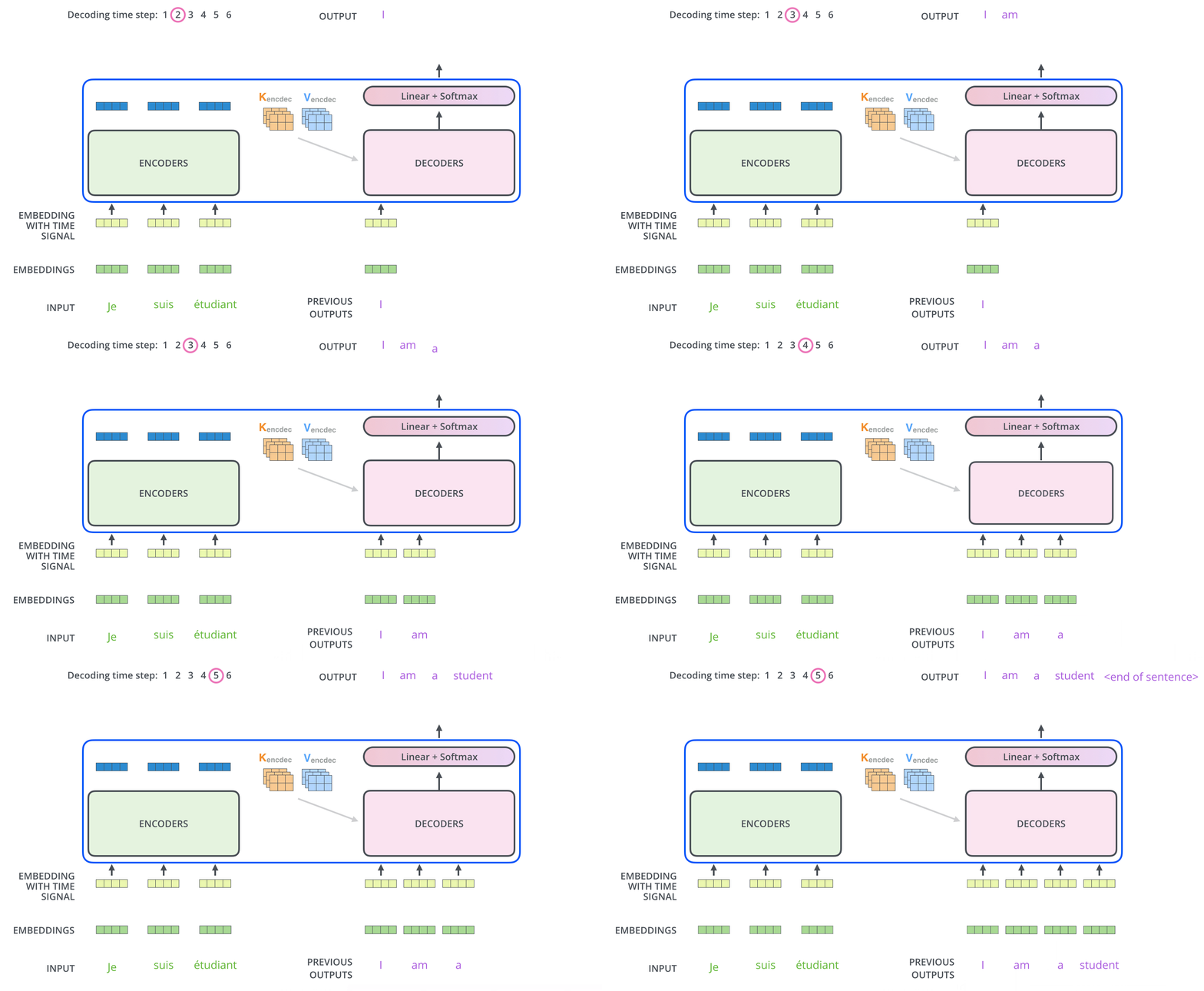
After finishing the encoding phase, we begin the decoding phase. Each step in the decoding phase outputs an element
for the output sequence (the English translation sentence for example).
The following steps repeat the process until a special symbol is reached indicating the transformer decoder has
completed its output. The output of each step is fed to the bottom decoder in the next time step, and the decoders
bubble up their decoding results just like the encoders did. And just like we did with the encoder inputs, we embed and
add positional encoding to those decoder inputs to indicate the position of each word.
The self-attention layers in the decoder does operate in a slightly different way than the ones in the encoder: In the
decoder, the self-attention layer is only allowed to attend to earlier positions in the output sequence. This is done
by masking future positions (setting them to -inf) before the softmax step in the self-attention calculation.
The decoder stack outputs a vector of floats. A final Linear layer followed by a Softmax Layer turns that into an
output word.
The Linear layer is a simple fully connected neural network that projects the vector produced by the stack of
decoders into a much larger vector called a logits vector.
Let’s assume that our model knows 10,000 unique English words (our model’s “output vocabulary”) that it’s learned from
its training dataset. This would make the logits vector 10,000 cells wide – each cell corresponding to the score of a
unique word. That is how we interpret the output of the model followed by the Linear layer.
The softmax layer then turns those scores into probabilities (all positive, all add up to 1.0). The cell with the
highest probability is chosen, and the word associated with it is produced as the output for this time step.
This figure starts from the bottom with the vector produced as the output of the decoder stack. It is then turned into
an output word.
At this point, it is not hard to imagine what transformer really does is fine-tuning a pre-trained model with private
data to generate a more customized model. In this section, we would demonstrate an example to show that by fine-tuning
Whisper model with German video data.
This would evolve into a robust project, but we would just be showing the minimal-code. Fine-tuning Whisper on
domain-specific video data (like German media) is a perfect use case for transformers.
To fine-tune a pre-trained model with Hugging Face Transformer, we must train with data format that works with Hugging
Face ecosystem. This is when Hugging Face Datasets comes into play. The essential code for using
Hugging Face Datasets to generate such data is the following:
1
from datasets import Dataset, Audio
2
3
DATASET_PATH =Path("my/dataset/output/path")
4
5
valid_records =[]
6
7
for autio_path, transcript inzip(autio_paths, transcripts):
Note that the processor is configured specifically for German transcription
To load pre-trained whisper model:
1
from transformers import WhisperForConditionalGeneration
2
3
model = WhisperForConditionalGeneration.from_pretrained(model_id)
TIP
Whisper is designed to be a “zero-shot” model, meaning it usually tries to guess what language is being spoken and
whether it should translate it to English or just transcribe it. Since Whisper is a multilingual model capable of many
tasks (like translating or identifying languages), there needs some settings to lock it into a specific behavior
sometimes after the model is loaded. Two most frequently used settings are
1
# Force the model to generate German text during training and inference
2
model.config.forced_decoder_ids =None
3
model.config.suppress_tokens =[]
If we are training a model for a specific task like transcription on one target language only, we would usually use
When we set forced_decoder_ids this way, we are forcing the model to output German text. Without this, the model
might occasionally hallucinate and switch to English or another language if the audio is fuzzy. By using the processor
to get these IDs, we are telling the model: “Your target language is German, and your task is transcription”. But
for a general purpose fine-tuning, we would simply give it None
By default, the pre-trained Whisper model has a list of “suppressed tokens” - specific symbols or characters it is
instructed never to say. This often includes special formatting tokens or certain technical markers that were restricted
during its initial training to keep its output clean.
Setting suppress_tokens = [] clears that list. In the context of fine-tuning, we want the model to have full access to
its entire vocabulary. We are essentially telling the model: “Do not ignore any parts of your vocabulary; you have
permission to use all tokens necessary to accurately represent the German training data”.
Training involves loading a German dataset (such as Mozilla Data Collective),
preprocessing the audio to 16kHz, and using the Seq2SeqTrainer. This component manages the training loop, evaluation,
and checkpoint saving.
To deploy the model to a production-ready webservice that adapts to both CPU and GPU hardware ready for inferencing,
we load the model we just trained.
We first define the model path and make things work on both CPU and GPU machine: