Transformers are the foundational technology behind most of the modern AI tools we use every day. The most prominent
real-life applications of Transformer models in Natural Language Processing (NLP), for example, include
Machine Translation
This was the original task the Transformer was designed for. Services like Google Translate
use Transformer models to read an entire sentence in one language, understand its full context, and then generate a
high-quality translation in another language.
AI Chatbots and Generative AI
This is the most famous application today. Tools like ChatGPT, Gemini, and Claude are built on large Transformer
models (specifically Decoder-only models like GPT). They are trained to predict the next logical word in a
response, allowing them to hold conversations, answer complex questions, write essays, and much more.
The model takes user-typed question (such as “What is the capital of France?”) as an initial sequence of text,
converts it into numerical tokens, and feeds it through transformer, which then “understands” the full context of the
question, also called prompt. The model’s response is in the form of a prediction for the very first word of its
answer (e.g., “The”).
In the “Generation” stage, Gemini, for example, employees autoregressive “loop” to build the response one word (or
token) at a time, with each new word depending on all the words that came before it:
To get Word #1 (“The”):
Input: “What is the capital of France?”
Output: “The”
To get Word #2 (“capital”):
Input: “What is the capital of France? The”
Output: “capital”
To get Word #3 (“of”):
Input: “What is the capital of France? The capital”
Output: “of”
To get Word #4 (“France”):
Input: “What is the capital of France? The capital of”
Output: “France”
…and so on. The model appends its own previously generated word to the sequence and feeds that new, longer sequence
back into itself to predict the very next word.
Code Generation (AI Assistants)
This is a specialized form of text generation where the “language” is code. Tools like GitHub Copilot and other
AI-powered IDEs use Transformer models trained on billions of lines of public code. They can read our existing code
and comments to suggest auto-completions, write entire functions, or even help us debug.
With this sense of practicality in mind, let’s learn what’s under the hood of transformer.
The Transformer was introduced in the 2017 paper “Attention Is All You Need” by researchers at Google. Its creation
was a direct response to the fundamental limitations of the dominant sequence-to-sequence (seq2seq) models of the time:
Recurrent Neural Networks (RNNs), including LSTMs and GRUs.
Transformers are everywhere and its models are used to solve all kinds of tasks across different modalities, including
natural language processing (NLP), computer vision, audio processing, and more. The
🤗 Transformers library by Hugging Face provides the functionality to
create and use those shared models. The Model Hub contains millions of pretrained models that anyone can download and
use. We can also upload our own models to the Hub
Before diving into how Transformer models work under the hood, let’s look at an example of how they can be used to solve
some interesting NLP problems to give us some intuitive feels.
The most basic object in the 🤗 Transformers library is the pipeline() function. It connects a model with its
necessary preprocessing and postprocessing steps, allowing us to directly input any text and get an intelligible
answer. Let’s take named entity recognition as an example
TIP
Named entity recognition (NER) is a task where the model has to find which parts of the input text correspond to
entities such as persons, locations, or organizations.
1
from transformers import pipeline
2
3
ner =pipeline("ner",grouped_entities=True)
4
ner("My name is Jiaqi and I work at OpenML in Shenzhen.")
Here the model correctly identified that Jiaqi is a person (PER), OpenML an organization (ORG), and Shenzhen a
location (LOC).
There are three main steps involved when we pass some text to the pipeline above:
The text is preprocessed into a format the model can understand.
The preprocessed inputs are passed to the model.
The predictions of the model are post-processed, so we can make sense of them.
The pipeline() function supports multiple modalities allowing us to work with not just text, but also images, audio,
and even multimodal tasks. In this post we’ll focus on text tasks
All the Transformer models have been trained as large language models and is primarily composed of 2 blocks:
Encoder (left): The encoder receives an input and builds a representation of it (its features). This means that
the model is optimized to acquire understanding from the input.
Decoder (right): The decoder uses the encoder’s representation (features) along with other inputs to generate a
target sequence. This means that the model is optimized for generating outputs.
IMPORTANT
Transformers are large language models
A key feature of Transformer models is that they are built with special layers called attention layers. In fact, the
title of the paper introducing the Transformer architecture was “Attention Is All
You Need”! But before diving into the real business of transformers, we must
learn what was before the transformer.
In the previous section, we looked at attention – a ubiquitous method in modern deep
learning models that helps improve the performance of neural machine translation applications. The true power of
attention, and what drives the amazing abilities of large language models, was, however, first explored in the
well-known Attention Is All You Need paper released in 2017. The authors proposed a network architecture
called the Transformer, which was solely based on the attention mechanism and removed the recurrence network
that we discussed previously. Compared to the recurrence network, the Transformer
could be trained in parallel, which tremendously sped up training as we will be seeing shortly.
If transformer removed RNN, what is the point of studying RNN today?
In addition to its foundational role with respect to transformer, RNN has its dominance over efficiency and niche
applications.
Transformers are not always the best tool for the job. Their core “self-attention” mechanism has a computational and
memory cost that scales quadratically with the sequence length (O(n2)). RNNs, by contrast, scale linearly (O(n)).
This makes RNNs a better choice in several real-world scenarios:
Edge Computing & Mobile Devices: RNNs are much smaller and “lighter” than Transformers. For tasks on a device with
limited memory and power (like a smartphone or a smart speaker), an RNN is far more efficient. Our phone likely uses a
small RNN for real-time tasks like “wake word” detection (“Hey Google,” “Hey Siri”).
Real-Time Time-Series Data: For tasks like predicting stock prices, sensor data, or electricity demand, the data
is often a continuous, never-ending stream. An RNN’s design, which processes one step at a time, is a very natural and
efficient fit for this kind of streaming data.
Specific Small-Scale Problems: If we have a simple sequence task with short dependencies, using a massive
Transformer is often overkill. A simple LSTM can train faster, use fewer resources, and perform just as well.
In this section, therefore, we will be looking at transformer – a model that uses attention to boost the speed
with which these models can be trained. Transformer outperforms the Google Neural Machine Translation model in specific
tasks. The biggest benefit, however, comes from how transformer lends itself to parallelization. It is in fact
Google Cloud’s recommendation to use transformer as a reference model to use their Cloud TPU offering. So let’s
try to break the model apart and look at how it functions.
TIP
Through the visually educational nature of this book and with over 250 custom-made figures, Hands-On Large Language Modelsexpands this section thoroughly in its Chapter 3:
Make sure to check out its supplemental material (code examples, exercises, etc.) as well:
Let’s begin by looking at the model as a single black box. In a machine translation application, it would take a
sentence in one language, and output its translation in another.
Popping open that Optimus Prime goodness, we see an encoding component, a decoding component, and connections between
them.
The encoding component is a stack of encoders (In its original paper Attention is All You Need, 6 encoders and
decoders each (12 in total) were stacked on top of each other - there’s nothing magical about the number 6, one can
definitely experiment with other arrangements). The decoding component is a stack of decoders of the same number.
The encoders are all identical in structure (yet they do not share weights). Each one is broken down into two
sub-layers:
The encoder’s inputs first flow through a self-attention layer - a layer that helps the encoder look at other words
in the input sentence as it encodes a specific word. We’ll look closer at self-attention later in this post.
The outputs of the self-attention layer are fed to a feed-forward neural network. The exact same feed-forward network is
independently applied to each position.
The decoder has both those layers, but between them is an attention layer that helps the decoder focus on relevant parts
of the input sentence (similar to what attention does in seq2seq models).
Now that we’ve seen the major components of the model, let’s start to look at the various vectors/tensors and how they
flow between these components to turn the input of a trained model into an output.
As is the case in NLP applications in general, we begin by turning each input word into a vector using embedding algorithm.
Each word is embedded into a vector of size 512. We’ll represent those vectors with these simple boxes.
The embedding only happens in the bottom-most encoder. The abstraction that is common to all the encoders is that they
receive a list of vectors each of the size 512 – In the bottom encoder that would be the word embeddings, but in other
encoders, it would be the output of the encoder that’s directly below. The size of this list is hyperparameter we
can set – basically it would be the length of the longest sentence in our training dataset.
After embedding the words in our input sequence, each of them flows through each of the two layers of the encoder:
Here we begin to see one key property of the Transformer, which is that the word in each position flows through its own
path in the encoder. There are dependencies between these paths in the self-attention layer. The feed-forward layer,
however, does not have those dependencies and thus the various paths can be executed in parallel while flowing through
the feed-forward layer.
Next, we’ll switch up the example to a shorter sentence and look at what happens in each sub-layer of the encoder.
As we’ve mentioned already, an encoder receives a list of vectors as input. It processes this list by passing these
vectors into a ‘self-attention’ layer, then into a feed-forward neural network, then sends out the output upwards to the
next encoder.
The word at each position passes through a self-attention process. Then, they each pass through a feed-forward neural
network - the exact same network with each vector flowing through it separately.
Let’s say the following sentence is an input sentence we want to translate:
1
The animal didn't cross the street because it was too tired
What does “it” in this sentence refer to? Is it referring to the street or to the animal? It’s a simple question to a
human, but not as simple to an algorithm. When the model is processing the word “it”, self-attention allows it to
associate “it” with “animal”, because as the model processes each word (each position in the input sequence),
self-attention allows it to look at other positions in the input sequence for clues that can help lead to a better
encoding for this word.
Recall that with RNNs, maintaining a hidden state allows an RNN to incorporate its representation of previous
words/vectors it has processed with the current one it’s processing. Self-attention is the method the Transformer uses
to bake the “understanding” of other relevant words into the one we’re currently processing.
As we are encoding the word “it” in encoder #5 (the top encoder in the stack), part of the attention mechanism was
focusing on “The Animal”, and baked a part of its representation into the encoding of “it”.
Let’s first look at how to calculate self-attention using vectors in steps, then proceed to look at how it’s actually
implemented – using matrices.
Create 3 vectors from each of the encoder’s input vectors (in this case, the embedding of each word):
a Query vector
a Key vector, and
a Value vector
These vectors are created by multiplying the embedding by three matrices from the training process and are smaller in
dimension than the embedding vector. Their dimensionality is 64, while the embedding and encoder input/output vectors
have dimensionality of 512. They don’t have to be smaller though; this is an architecture choice to make the
computation of multiheaded attention (mostly) constant.
Multiplying X1 by the WQ weight matrix produces q1, the “query” vector associated with that word. We end up
creating a “query”, a “key”, and a “value” projection of each word in the input sentence.
What are the “query”, “key”, and “value” vectors?
They’re abstractions that are useful for calculating and thinking about attention. We will make them clear in the
following discussions
Compute scores of every word in a sentence with respect to one particular word. For instance, when we calculate
the self-attention for the first word in this example, “Thinking”, we need to score each word of the input sentence
against this word. The score determines how much focus to place on other parts of the input sentence as we encode a
word, i.e. “Thinking”, at a certain position.
The score is calculated by taking the dot product of the query vector with the key vectors of each word we’re
scoring. For example, in our 2-word sentence, if we’re processing the self-attention for the word “Thinking”, there
would be 2 scores:
the dot product of q1 and k1: q1⋅k1
the dot product of q1 and k2: q1⋅k2
Divide the scores by 8 (the square root of the dimension of the key vectors used in the paper – 64. This leads to
having more stable gradients. There could be other possible values, but this is the default)
Pass the result through a softmax operation, which normalizes the scores so they’re all positive and add up to 1
This softmax score determines how much each word will be expressed at this position. It would be obvious that a word
at its own position has the highest softmax score (such as 0.88 for “Thinking” itself), but sometimes it’s useful to
attend to another word that is relevant to the current word.
Multiply each value vector by the softmax score (in preparation to sum them up). The intuition here is to keep
intact the values of the word(s) we want to focus on, and drown-out irrelevant words (by multiplying them by tiny
numbers like 0.001, for example).
Sum up the weighted value vectors. This produces the output of the self-attention layer at this position (for the
first word, “Thinking”).
That concludes the self-attention calculation. The resulting vector is one we can send along to the feed-forward neural
network. In the actual implementation, however, this calculation is done in matrix form for faster processing in the
following way:
To calculate the Query, Key, and Value matrices, we pack our embeddings into a matrix X, and multiplying it by the
weight matrices we’ve trained (WQ, WK, WV):
Every row in the X matrix corresponds to a word in the input sentence. We again see the difference in size of the
embedding vector (512, or 4 boxes in the figure), and the q/k/v vectors (64, or 3 boxes in the figure above)
Then we, since we are dealing with matrices, condense the rest of the vector steps into one formula to calculate the
outputs of the self-attention layer:
The Attention is All You Need paper further refined the self-attention layer by adding a mechanism called
“multi-headed” attention. This improves the performance of the attention layer in 2 ways:
It expands the model’s ability to focus on different positions. In the example above, z1 from step 6 contains a
little bit of every other encoding, but it could be dominated by the actual word itself. If we’re translating a
sentence like “The animal didn’t cross the street because it was too tired”, it would be useful to know which word
“it” refers to.
It gives the attention layer multiple “representation subspaces”. As we will see shortly, with multi-headed attention
we have not only one, but multiple sets of Query/Key/Value weight matrices (the Transformer uses 8 attention heads,
so we end up with 8 sets for each encoder/decoder). Each of these sets is randomly initialized. After training, each
set is used to project the input embeddings (or vectors from lower encoders/decoders) into a different representation
subspace.
If we do the same self-attention calculation we outlined above, just 8 different times with different weight matrices,
we end up with 8 different Z matrices
This leaves us with a bit of a challenge. The feed-forward layer is expecting a single matrix (a vector for each word),
not eight. We need a way to condense these eight down into a single matrix. We do that by concatenating the matrices and
multiplying them by an additional weights matrix WO.
That’s pretty much all there is to multi-headed self-attention. With everything in one visual, here is what how to
calculate self-attention:
Representing The Order of The Sequence Using Positional Encoding#
One thing that’s missing from the model as we have described it so far is a way to account for the order of the words
in the input sequence.
To address this, the transformer adds a vector to each input embedding. These vectors follow a specific pattern that the
model learns, which helps it determine the position of each word, or the distance between different words in the
sequence. The intuition here is that adding these values to the embeddings provides meaningful distances between the
embedding vectors once they’re projected into q/k/v vectors and during dot-product attention.
To give the model a sense of the order of the words, we add positional encoding vectors — the values of which follow
a specific pattern.
If we assumed the embedding has a dimensionality of 4, the actual positional encodings would look like this:
The Attention is All You Need paper generates the positional encoding patterns (formula described in section 3.5) in
the following way:
There are alternative methods for positional encoding. The one presented in paper, however, does give the advantage of
being able to scale to unseen lengths of sequences (e.g. if our trained model is asked to translate a sentence longer
than any of those in our training set).
Here is an example of alternative in Tensor2Tensor implementation of the
Transformer which, instead of interweaving the two signals, concatenates:
A real example of positional encoding for 20 words (rows) with an embedding size of 512 (columns). We can see that it
appears split in half down the center. That’s because the values of the left half are generated by one function
(which uses sine), and the right half is generated by another function (which uses cosine). They’re then
concatenated to form each of the positional encoding vectors.
In the following figure above, each row corresponds to a positional encoding of a vector. So the first row would be the
vector we’d add to the embedding of the first word in an input sequence. Each row contains 512 values – each with a
value between 1 and −1. We’ve color-coded them so the pattern is easy to see
Each sub-layer (self-attention, feed-forward neural network) in each encoder has a residual connection around it, and is
followed by a layer-normalization step.
If we’re to visualize the vectors and the layer-norm operation associated with self attention, it would look like this:
This goes for the sub-layers of the decoder as well. If we are to think of a Transformer of 2 stacked encoders and
decoders, it would look something like this:
Now that we’ve covered most of the concepts on the encoder side, we basically know how the components of decoders work
as well. But let’s take a look at how they work together.
The encoder start by processing the input sequence. The output of the top encoder is then transformed into a set of
attention vectors K and V. These are to be used by each decoder in its “encoder-decoder attention” layer which helps the
decoder focus on appropriate places in the input sequence:
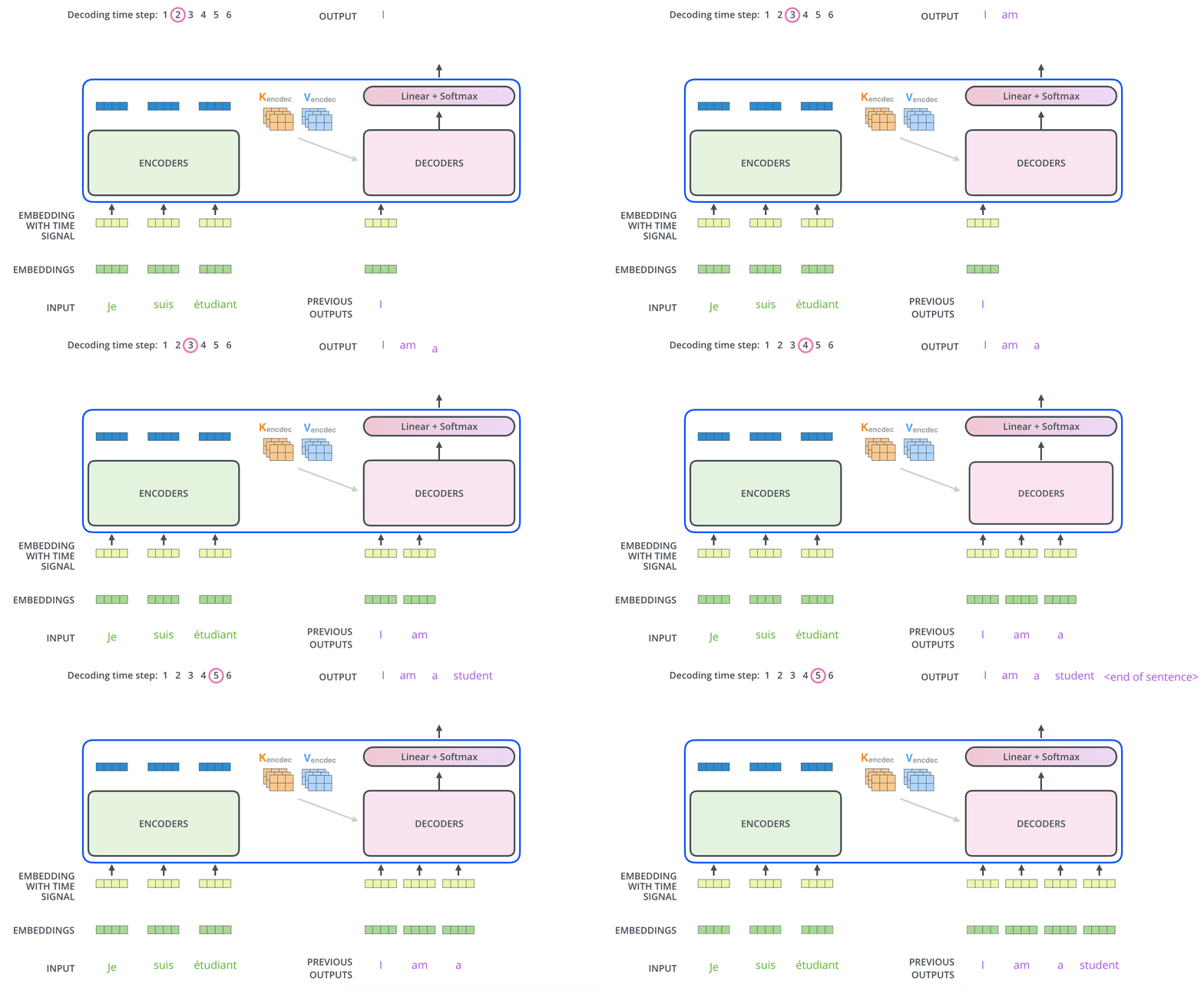
After finishing the encoding phase, we begin the decoding phase. Each step in the decoding phase outputs an element
for the output sequence (the English translation sentence for example).
The following steps repeat the process until a special symbol is reached indicating the transformer decoder has
completed its output. The output of each step is fed to the bottom decoder in the next time step, and the decoders
bubble up their decoding results just like the encoders did. And just like we did with the encoder inputs, we embed and
add positional encoding to those decoder inputs to indicate the position of each word.
The self-attention layers in the decoder does operate in a slightly different way than the ones in the encoder: In the
decoder, the self-attention layer is only allowed to attend to earlier positions in the output sequence. This is done
by masking future positions (setting them to -inf) before the softmax step in the self-attention calculation.
The decoder stack outputs a vector of floats. A final Linear layer followed by a Softmax Layer turns that into an
output word.
The Linear layer is a simple fully connected neural network that projects the vector produced by the stack of
decoders into a much larger vector called a logits vector.
Let’s assume that our model knows 10,000 unique English words (our model’s “output vocabulary”) that it’s learned from
its training dataset. This would make the logits vector 10,000 cells wide – each cell corresponding to the score of a
unique word. That is how we interpret the output of the model followed by the Linear layer.
The softmax layer then turns those scores into probabilities (all positive, all add up to 1.0). The cell with the
highest probability is chosen, and the word associated with it is produced as the output for this time step.
This figure starts from the bottom with the vector produced as the output of the decoder stack. It is then turned into
an output word.
At this point, it is not hard to imagine what transformer really does is fine-tuning a pre-trained model with private
data to generate a more customized model. In this section, we would demonstrate an example to show that by fine-tuning
Whisper model with German video data.
This would evolve into a robust project, but we would just be showing the minimal-code. Fine-tuning Whisper on
domain-specific video data (like German media) is a perfect use case for transformers.
To fine-tune a pre-trained model with Hugging Face Transformer, we must train with data format that works with Hugging
Face ecosystem. This is when Hugging Face Datasets comes into play. The essential code for using
Hugging Face Datasets to generate such data is the following:
1
from datasets import Dataset, Audio
2
3
DATASET_PATH =Path("my/dataset/output/path")
4
5
valid_records =[]
6
7
for autio_path, transcript inzip(autio_paths, transcripts):
Note that the processor is configured specifically for German transcription
To load pre-trained whisper model:
1
from transformers import WhisperForConditionalGeneration
2
3
model = WhisperForConditionalGeneration.from_pretrained(model_id)
TIP
Whisper is designed to be a “zero-shot” model, meaning it usually tries to guess what language is being spoken and
whether it should translate it to English or just transcribe it. Since Whisper is a multilingual model capable of many
tasks (like translating or identifying languages), there needs some settings to lock it into a specific behavior
sometimes after the model is loaded. Two most frequently used settings are
1
# Force the model to generate German text during training and inference
2
model.config.forced_decoder_ids =None
3
model.config.suppress_tokens =[]
If we are training a model for a specific task like transcription on one target language only, we would usually use
When we set forced_decoder_ids this way, we are forcing the model to output German text. Without this, the model
might occasionally hallucinate and switch to English or another language if the audio is fuzzy. By using the processor
to get these IDs, we are telling the model: “Your target language is German, and your task is transcription”. But
for a general purpose fine-tuning, we would simply give it None
By default, the pre-trained Whisper model has a list of “suppressed tokens” - specific symbols or characters it is
instructed never to say. This often includes special formatting tokens or certain technical markers that were restricted
during its initial training to keep its output clean.
Setting suppress_tokens = [] clears that list. In the context of fine-tuning, we want the model to have full access to
its entire vocabulary. We are essentially telling the model: “Do not ignore any parts of your vocabulary; you have
permission to use all tokens necessary to accurately represent the German training data”.
Training involves loading a German dataset (such as Mozilla Data Collective),
preprocessing the audio to 16kHz, and using the Seq2SeqTrainer. This component manages the training loop, evaluation,
and checkpoint saving.
To deploy the model to a production-ready webservice that adapts to both CPU and GPU hardware ready for inferencing,
we load the model we just trained.
We first define the model path and make things work on both CPU and GPU machine: